
Desktop gadgets for Windows 11: what replaced the sidebar
Windows 11 has no desktop gadgets. Why Microsoft removed them, why the Widgets board is not the same thing, and the apps that put gadgets on the desktop.
Windows 11 has no desktop gadgets. Microsoft removed the gadget platform from Windows in Windows 8 and never brought it back. The built-in Widgets board is a flyout that overlays the desktop from the taskbar or Win+W, and then closes again. DeskDash and the other apps below put gadgets back on the desktop itself.
What desktop gadgets were, and why Microsoft removed them
Gadgets arrived with the Windows Vista Sidebar, "a translucent, lockable panel on the desktop" in Microsoft's words, and a gadget could be dragged off the panel onto the desktop. Windows 7 dropped the Sidebar as a container: gadgets were "hosted and displayed on the desktop", though sidebar.exe still owned them all. The set most people remember, going by Wikipedia's list of the Vista set, is the clock, calendar, CPU meter, weather, notes, currency, feed headlines and slide show.
The fact that matters most today is how much a gadget was allowed to do. Microsoft's security page puts it under the heading Full Trust: "After the user accepts the warning, the gadget will run with all of the permissions associated with the user's login account". There was no per-gadget grant, and no signing requirement, because certificates were "costly and not commonly used".
That is what ended the platform. On 10 July 2012 Microsoft published Security Advisory 2719662, "Vulnerabilities in Gadgets Could Allow Remote Code Execution", with a Fix it that disabled Windows Sidebar and Gadgets on Vista and Windows 7. It named two routes in. One was a legitimate gadget with a vulnerability: an attacker who exploited it "could take complete control of the affected system" if the user was logged on as an administrator. The other was a malicious gadget the user is tricked into installing. Windows 8 removed gadgets entirely, because "even benign Gadgets could be exploited".
Is the Windows 11 Widgets board a replacement?
No. Microsoft's current widgets documentation, dated July 2026, defines the board as "a flyout plane that overlays the Windows desktop" when you click the Widgets icon on the taskbar, press Windows+W, or swipe from the left edge. The same page states that "the only Widgets host is the Widgets Board built into Windows 11", so a widget cannot be displayed anywhere else.
Every action on Microsoft's widgets support page happens inside that board: add with the "+" button, remove from the widget's menu, drag within the pinned section. It never describes placing a widget on the desktop. A Microsoft Q&A answer from November 2025 lists moving widgets outside the board among the things Windows cannot do.
A Feedback Hub request for desktop pinning reached 214 upvotes, and a Microsoft engineer replied that "this isn't something we currently support". Pocket-lint's verdict in December 2025: it is "still frustratingly impossible to place them onto your desktop in the vein of Windows Vista and 7 Gadgets".
What Microsoft is changing is the board's noise, not its place. In Insider Experimental Build 26300.8346 from 1 May 2026, it is testing quiet-by-default settings: open-on-hover off, taskbar badging off, and taskbar alerts limited until you choose to open Widgets. The board costs nothing beyond Windows itself.
What puts gadgets on a Windows 11 desktop today?
Seven apps do it, on the desktop or in floating windows. The Widgets board is the last row, as the baseline.
| Tool | Where widgets live | What a widget can do on the PC | Where widgets come from | Maintained | Price |
|---|---|---|---|---|---|
| Rainmeter | On the desktop | A skin can run any program, hidden, no prompt | Skin sites: DeviantArt, forums, Reddit, GitHub | 4.5.26, 20 May 2026 | Free, GPL v2 |
| DeskDash | On the desktop, behind normal windows | Only what you grant, per widget, sandboxed | Built-in marketplace, first-party and community, also on the web | Current app, updates itself | One-time purchase, all widgets free |
| GadgetPack | On the desktop | Everything your account can, Windows 7 platform | 50+ bundled, plus .gadget files | 42.0, 11 May 2026 | Free |
| Gadgets Revived | On the desktop and sidebar | Everything your account can, Windows 7 platform | Its own catalogue | No version or date published | Not stated |
| Better Widgets | Floating, resizable, lockable | Not stated | Ten vendor widget types | Microsoft Store listing | Paid, one-time purchase |
| Widget Launcher | Floating windows | Third-party extensions in a full-trust Store app | Microsoft Store | Microsoft Store listing | Free download |
| BeWidgets | Floating windows | The vendor's own widgets, full-trust Store app | The vendor's own | 1.0.28.0, 12 March 2026 | Paid premium option |
| Windows 11 Widgets board | In a flyout over the desktop | Adaptive Cards fed by a packaged app or PWA | Apps that ship a widget provider | Docs dated July 2026 | Included with Windows |
DeskDash
DeskDash puts widgets on the desktop, behind your normal windows. They are click-through except where a widget is interactive, so the desktop stays a desktop: nothing to open, nothing to close, and basically invisible to your resource usage.
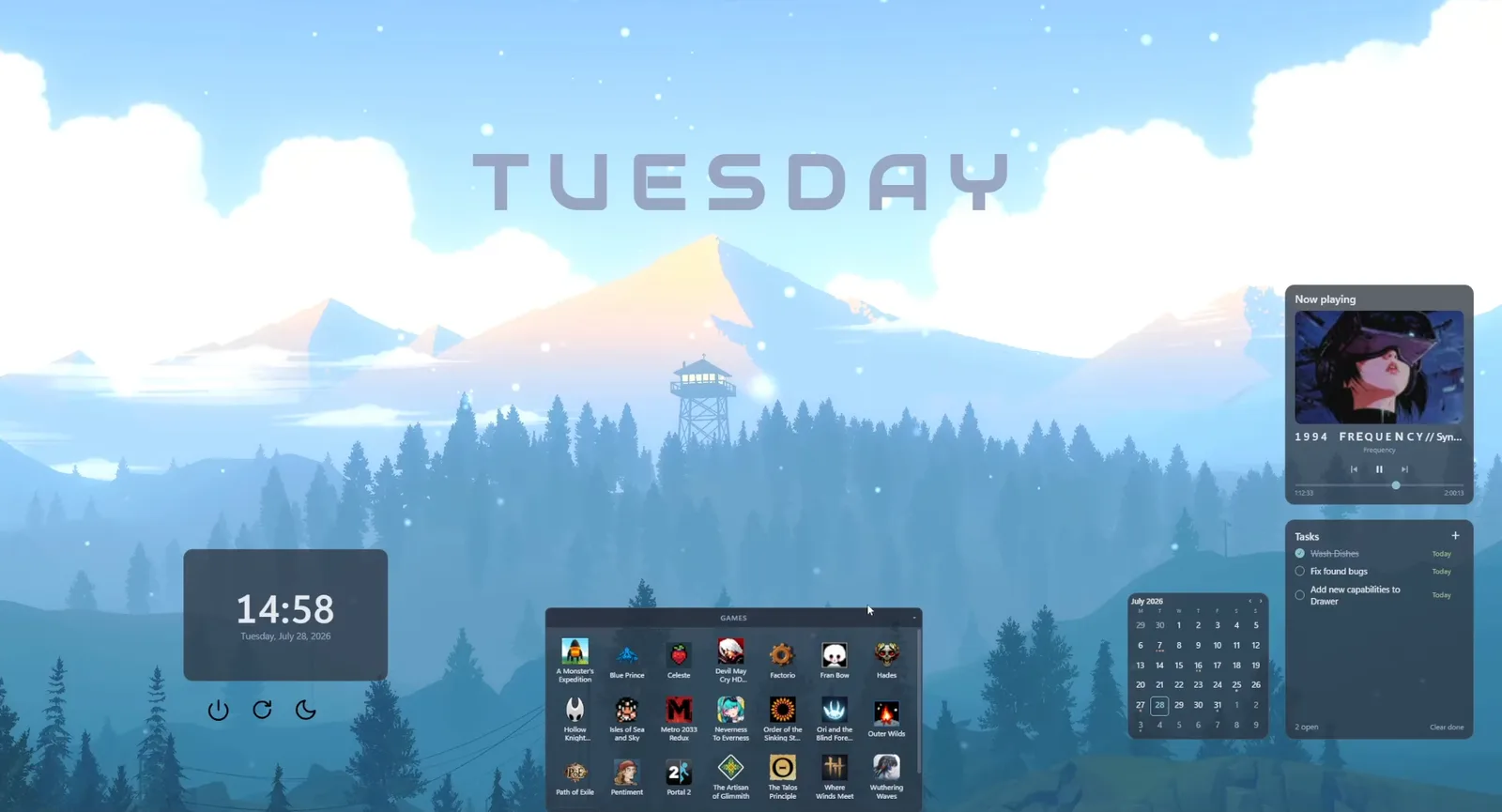
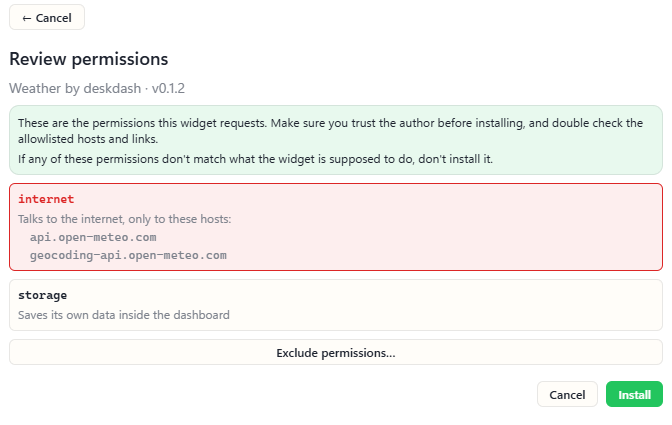
The classic set is in the marketplace. A Clock with big readable time and date. A Calendar with month and week views, where you click a day to add an event. System Vitals with live CPU, RAM, GPU, disk and network sparklines, or System Rings with the same numbers as radial gauges. Weather for your city through Open-Meteo, with no API key to set up. A Sticky Note that keeps whatever you type on it. But also new ones are added every single day, and docs are available if you want to build your own. Each installs with one click from the built-in marketplace, and every listing is browsable on the website without the app.
What sets them apart from a gadget is what they do. The widgets are interactive and keep their state. Desktop Drawer turns the desktop or any folder into an app drawer that collapses to a slim handle on a screen edge. Todo and Habits keep the lists you tick off, and Schedule carries a weekly timetable with reminders. Now Playing controls the music, System Controls switches wifi, volume and battery from one bar, and Steam Recent lists your last Steam games with hours and achievements and launches one on click. Widgets and taskbars can also list the Steam and GOG games installed on the PC and start them, with nothing to sign in to.
Each widget runs sandboxed. Before you install it you see exactly what it can access and decide what to grant, per widget. A widget has no direct reach into files, the network or other widgets, and a misbehaving widget only affects itself. That is the direct answer to the old platform's Full Trust, where one accepted warning handed a gadget every permission of your account. The security docs describe the sandbox layer by layer.
Every display gets its own layout, and layouts come back when a display reconnects. The same app can replace the Windows taskbar with one from its taskbar marketplace, a macOS-style dock among them, under the same sandbox and grants, and the Windows taskbar comes back with one click.
Widgets are plain HTML, CSS and JavaScript, and anyone can build and submit one; other authors already have, and Pulseglass Dock is a community taskbar. DeskDash runs on Windows 10 and Windows 11, 64 bit. It is a one-time purchase with no subscription, every widget and taskbar is free, and the current amount is on the download page. Against the skinning tools, Rainmeter alternatives in 2026 covers what each one's widgets can reach on your PC.
GadgetPack, with Gadgets Revived
GadgetPack is at version 42.0, released 11 May 2026, and it installs "the Gadget Platform that was originally present in Windows 7 with some modifications that make it work on newer Operating Systems". It ships more than 50 gadgets, among them CPU, GPU, network and drive meters, a calendar, clocks, weather and sticky notes, and it accepts custom .gadget files. It is free, with an optional Donate link and no paid tier.
Because the platform it revives is the Windows 7 one, a gadget runs with all the permissions of your user account, and Microsoft states there were "no significant changes to the security model" between Vista and Windows 7. GadgetPack's own FAQ says it plainly: "Gadgets can contain viruses like any other software." Its advice is to trust the source and use antivirus.
Three practical notes. On Windows 11 the gadget entries sit behind "Show more options" in the right-click menu. AVG's Identity Protection can block GadgetPack silently; the fix is antivirus exceptions for 8GadgetPack.exe and sidebar.exe. And a Windows update can uninstall it: the same FAQ says to open the "Restore gadgets" shortcut it leaves on the desktop, or to reinstall the current version.
Gadgets Revived is the second revival installer: "Classic Desktop gadgets and sidebar from Windows 7 working in Windows 11 and Windows 10", with Windows 8.1 also supported, and a catalogue from Battery to Utility that includes Clock, Calendar, Weather and System Information. The download is a zip: unpack, run, pick a language, install. The page shows no version number, release date or security statement.
Rainmeter
Rainmeter is free and open source under the GNU GPL v2, with its source public on GitHub. The current release is 4.5.26, published 20 May 2026. A skin is a plain-text INI file: measures gather values, meters display them. Customizing means editing that file; a settings panel exists only where the skin author built one.
Skins come from DeviantArt, Reddit, the forum and GitHub, and Rainmeter's own manual warns that "most sites have no policy of verifying either the identity of the uploader or the integrity of the files". The RunCommand plugin lets a skin execute any external program, hidden by default, with no prompt to the user. One thing no other tool here does: with HWiNFO installed and running, Rainmeter reads its sensor values through the Windows Registry. The head-to-head is in DeskDash vs Rainmeter.
Widget apps from the Microsoft Store
Three Store apps put widgets in floating windows.
Better Widgets offers ten widget types, among them calendar, clock, system monitors, notes, to-do lists and weather. Once pinned to the desktop, widgets resize like windows, with an option to lock them in place. Pocket-lint lists it as a paid app on the Microsoft Store, a one-time purchase with no ads and no in-app purchases.
Widget Launcher is a free download on the Store. Its third-party extensions run inside a full-trust Store app with no documented permission model, and Pocket-lint notes that it shows brief ads when loading new widgets.
BeWidgets is at version 1.0.28.0, updated 12 March 2026, for Windows 10 and 11, with widgets for time, date, photos, finance and app shortcuts. It runs the vendor's own widgets only, inside a full-trust Store app.
How to choose
Four questions settle it.
- On the desktop or in a panel? DeskDash, GadgetPack, Gadgets Revived and Rainmeter put widgets on the desktop; the Store apps float them as windows, and the Widgets board is a flyout you open and close.
- Which gadget do you need? DeskDash's marketplace carries the clock, todo, pomodoro timer, sticky note, system meters and a Steam games launcher, among many others. GadgetPack has meters, weather and sticky notes, Gadgets Revived has System Information, Weather and Clock categories, and Better Widgets has system monitors, notes and weather.
- How does it get updated? DeskDash updates itself, and its widgets update from the marketplace. A Windows update can uninstall GadgetPack, and its FAQ documents the restore step. Gadgets Revived publishes no version number or release date. Rainmeter's current release is from May 2026.
- What can it do without asking? DeskDash shows you what each widget can access and asks before it runs. The Windows 7 platform runs a gadget with your account's full permissions after one warning. A Rainmeter skin can run a hidden program with no prompt.
Frequently asked
- Does Windows 11 have desktop gadgets?
- No. Microsoft removed gadgets in Windows 8 and never brought them back. The Windows 11 Widgets board is a flyout over the desktop, and Microsoft's documentation states it is the only place a widget can be shown.
- Can you get the Windows 7 gadgets on Windows 11?
- Yes. GadgetPack and Gadgets Revived both reinstall the Windows 7 gadget platform on Windows 11. With GadgetPack, the gadget entries sit behind "Show more options" in the right-click menu. More modern systems should look toward apps like DeskDash and Rainmeter.
- Are desktop gadgets safe?
- A gadget on the Windows 7 platform runs with all the permissions of your login account once you accept its warning. Microsoft's 2012 advisory named two routes of attack, a legitimate gadget with a vulnerability or a malicious one you are tricked into installing, and warned that gadgets can access your files and change their behavior at any time. GadgetPack's own FAQ says gadgets can contain viruses like any other software, so trust the source and run antivirus.
- What is the difference between gadgets and widgets?
- Gadgets are mini-applications built from XML, HTML, CSS and script, hosted on the desktop by the sidebar.exe process. A Windows 11 widget is an Adaptive Card fed by a packaged app or a PWA, and it shows only inside the Widgets board.
- How do you put widgets on the desktop instead of the Widgets panel?
- Windows itself offers no way: the board is the only host, and a Microsoft engineer told Feedback Hub voters that desktop pinning is not supported. A desktop widget app does it: DeskDash puts widgets on the desktop from its marketplace, GadgetPack and Rainmeter do too, and the Store apps float them as windows.
Keep reading
Is DeskDash safe? How every widget is sandboxed and asks before it runs
Is DeskDash safe? Every widget runs in a sandbox, reaches nothing on its own, and store widgets ask before they run and pass a human code review.
DeskDash vs Seelen UI: a whole desktop suite, or widgets and a taskbar
DeskDash vs Seelen UI compared: what each changes on Windows, where widgets come from, what a widget can reach, taskbars, multi-monitor and price.
DeskDash vs Rainmeter: what each one can reach on your PC
DeskDash vs Rainmeter, side by side: where widgets come from, what each one can run on your PC, sensors, multi-monitor, taskbar and price.