
System Vitals widget
by deskdash · v0.1.2 · 66 downloads
Widgets install from inside DeskDash.
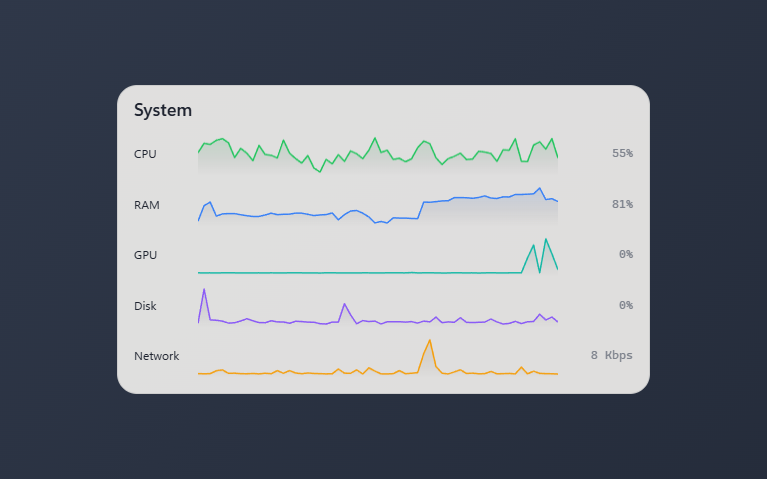
Live CPU / RAM / GPU / network sparklines from the host's 1Hz vitals stream
- Sparkline plus current value for CPU, RAM, GPU, disk, and network
- Fed by the host's 1Hz vitals stream
- Each metric can be toggled individually
- 60, 120, or 300 seconds of history
- Lines ride the theme's chart palette
About this widget
System Vitals is a quiet system monitor: one row per metric with a label, a sparkline, and the current value, fed by the host's 1Hz vitals stream. CPU, RAM, GPU, disk, and network can each be toggled on or off, and the sparklines keep 60, 120, or 300 seconds of history.
Every line draws in its own color from the theme's chart palette, so the widget follows whatever theme the dashboard is wearing. Metrics the machine never reports, like a missing GPU sensor, stay hidden instead of drawing empty rows.
What it can access
- system
Reads system stats like CPU, memory and battery
Settings you can adjust
- Title
Free text
- Show CPU
On or off
- Show RAM
On or off
- Show GPU
On or off
- Show disk
On or off
- Show network
On or off
- History (seconds)
One of: 60, 120, 300
- Panel style
One of: none, solid, transparent, image
- Background image
A file you pick
- Image fit
One of: cover, contain
Details
- Version
- v0.1.2
- Size
- 5 KB
- Uploaded
- 24 Jul 2026
- Last updated
- 17 Oct 2026
Version history
- v0.1.2
- 17 Oct 2026 · 5 KB
- v0.1.1
- 10 Aug 2026 · 5 KB
- v0.1.0
- 24 Jul 2026 · 5 KB


