
DeskDash vs Rainmeter: what each one can reach on your PC
DeskDash vs Rainmeter, side by side: where widgets come from, what each one can run on your PC, sensors, multi-monitor, taskbar and price.
DeskDash and Rainmeter both put live widgets on the wallpaper of a Windows desktop. DeskDash is a one-time purchase: sandboxed web widgets and/or taskbars from an in-app marketplace, each granted its capabilities before it runs. Rainmeter is free under GPL v2, a skin is a plain-text INI file from DeviantArt or a forum, and a skin can run any program. Which fits depends on what you want from the desktop.
DeskDash and Rainmeter side by side
| DeskDash | Rainmeter | |
|---|---|---|
| What it is | Sandboxed web widgets (HTML, CSS, JavaScript) on the wallpaper | INI skin engine: measures in, meters out |
| Where widgets come from | Built-in marketplace, first-party and community, every listing free | DeviantArt, Reddit, forum, GitHub; no first-party catalogue |
| Installing one | One click in the marketplace | Download a .rmskin, double-click, Skin Installer |
| Configuring one | Edit mode: drag, resize, per-widget settings with live preview | Right-click, Edit skin, change the .ini in a text editor |
| What a widget can reach | Isolated; each capability granted per widget before it runs | RunCommand runs any program, can hide its window, no documented prompt |
| Hardware sensors | System Vitals and System Rings: CPU, RAM, GPU, disk, network | CoreTemp, SpeedFan plugins, HWiNFO via registry; each needs that app running |
| Multi-monitor | Own layout per display; layouts return when a display reconnects | Position per skin with an @N screen index; drag between monitors |
| Taskbar | Replaces the Windows taskbar: custom ones | "It cannot change the appearance of your taskbar" |
| Updates | App auto-updates; marketplace Updates tab for widgets and taskbars | App updates itself; no documented way for a skin to update itself |
| Licence and price | One-time purchase, no subscription, every widget and taskbar included | Free, GPL v2 |
| Windows | Windows 10 and 11, 64 bit | Windows 7 or above |
What is each one?
DeskDash is a Windows app that turns the desktop into a live dashboard of sandboxed web widgets, with a taskbar from the same store; Rainmeter is free, open source software whose skins are plain-text INI files.
DeskDash widgets stay behind your normal windows and are click-through except where they are interactive. The same app can replace the Windows taskbar, and every widget is a plain web page built on a documented SDK.
Rainmeter is open source software, free of charge under the GNU GPL v2. A skin is a plain-text INI file with exactly three kinds of line, and the manual's minimal skin is four sections that print CPU use as text. Both belong to the wider field of desktop widget tools for Windows.
Where do the widgets come from?
DeskDash widgets come from one marketplace inside the app; Rainmeter skins come from DeviantArt, Reddit, the forums and GitHub, with no first-party catalogue.
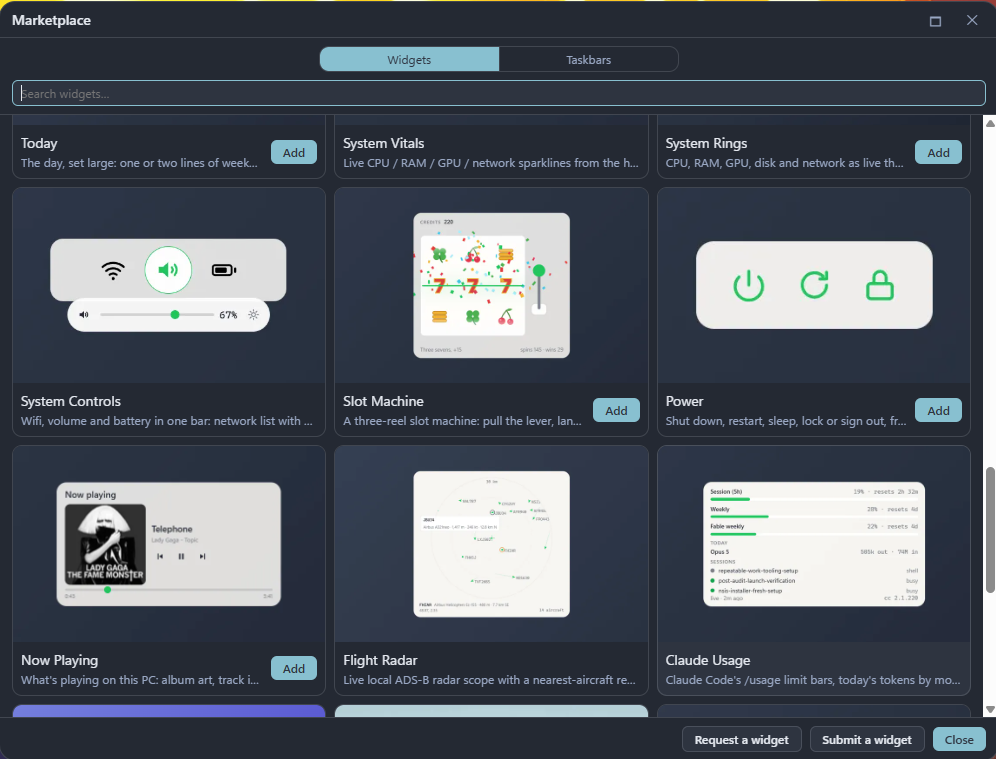
The DeskDash built-in marketplace has Widgets and Taskbars sections, each with Installed, Browse and Updates tabs, and you find, install, grant, update and remove everything there. Every listing is free, and the catalogue keeps growing with work by other authors beside the first-party widgets: Pulseglass Dock by kaladindmp is a community taskbar. Clocks, system stats and weather are the plain end of it. The rest do things and keep their state: Desktop Drawer turns the desktop or any folder into an app drawer that collapses to a handle on a screen edge, Todo and Habits keep the lists you tick off, Now Playing controls the music, System Controls switches wifi, volume and battery from one bar, and Steam Recent lists your last Steam games and launches one on click. Every listing is browsable on the website without the app, a "Request a widget" form sits in the store footer, and anyone can submit. Submissions are validated and reviewed before they publish.
Rainmeter's own Discover page sends you to four places: DeviantArt, which it calls "one of the largest online repositories of Rainmeter resources", the r/Rainmeter subreddit, the Rainmeter forums and a Lifehacker desktop pool. The manual's list adds GitHub and Flickr, notes that DeviantArt needs an account, and names no first-party catalogue and no in-app store. XDA describes the result: a web search for skins "returns a series of unofficial websites".
The famous suites are in mixed shape. Enigma was last pushed on 18 May 2024. The Monstercat visualizer, at 962 stars, was last pushed on 17 June 2023. Droptop Four was last pushed on 29 April 2026, shipped five releases that month, and updates by a download from its own site.
Long-time users say the same. One four-star AlternativeTo reviewer writes that "many old Rainmeter downloads are now forever lost, because sites like Customize.org are long dead" and that the community is looking for "another place to upload and archive their work". A five-star reviewer says "the template/layouts haven't been updated in a while" and "you have to trust sites like Deviant Art".
Rainmeter's manual is candid about those sites: "most sites have no policy of verifying either the identity of the uploader or the integrity of the files". It tells you never to download an .exe posing as a skin installer and to read the comments for malware reports. The Discover page repeats the caution for anything not from rainmeter.net.
How do you install and configure one?
A DeskDash widget installs in one click from the marketplace and is configured in a settings pane; a Rainmeter skin installs from a .rmskin package and is configured by editing its .ini file.
In DeskDash, edit mode drags, resizes, restyles, stacks and overlaps widgets on a grid, and every widget has its own settings with live preview. If you can make a web page, you can write a widget: HTML, CSS and JavaScript, no build step, with a scaffolder and typed SDK autocomplete in developer mode.
A Rainmeter skin arrives as a .rmskin package. You double-click it, the Skin Installer shows its options, and you click Install; one package can carry skins, layouts and plugins.
To change one, you right-click the skin, choose Edit skin, and the .ini opens in Notepad or your default text editor. You find the Variables section, change values, save and refresh. A graphical settings screen exists only if the skin's author built one, which the manual calls "more the exception than the rule". The manual's own ladder: editing a skin "may be scary if you are not a programmer", and writing one sits at HTML or JavaScript difficulty. XDA calls that config-file editing "intimidating for beginners".
What can a widget do to your PC?
A DeskDash widget runs sandboxed and gets each capability only after you grant it; a Rainmeter skin can run any program through its RunCommand plugin, and no prompt to you is documented.
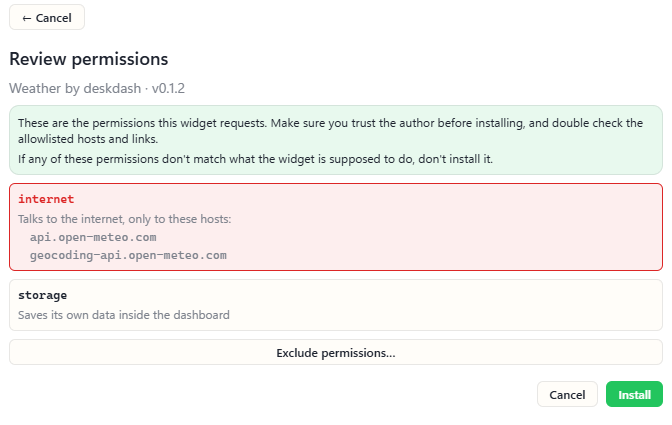
Each DeskDash widget runs in a sandbox, isolated, with no direct reach into files, the network or other widgets; all system access flows through the SDK. Before a widget runs you see exactly what it can access and grant each capability per widget, and taskbars ask the same way. A misbehaving widget only affects itself; the app and the other widgets keep running. API keys live in Windows Credential Manager, never in a widget, and every marketplace submission is validated and reviewed before it publishes.
Rainmeter's RunCommand plugin "executes an external command or program in Windows" and hands the output back to the skin. It defaults to cmd.exe, the Parameter option is the whole command line, and the State option "attempts to hide the program's window". The RunCommand page carries no security warning and describes no prompt to you before a skin runs a command.
Skins also run Lua 5.1 scripts on load, on update or on command. The manual names five unavailable functions; the io and os libraries are not on that list. The older !Execute bang, which ran external applications, is now "optional. Do not use it in new skins".
Third-party plugin .dll files ship inside skin packages and install with the skin. The install docs mention no signature or integrity check on a .rmskin.
Does DeskDash read hardware sensors the way Rainmeter does?
DeskDash reads CPU, RAM, GPU, disk, network, drive space, battery and wifi with no second app to run; Rainmeter also reaches temperatures, voltages and fan speeds, through CoreTemp, SpeedFan or HWiNFO running beside it.
DeskDash samples the machine once a second and hands the reading to every widget you granted system access: CPU, RAM, GPU, disk and network, plus drive space, battery and wifi. Which of them a tile shows is a setting on that tile, so two copies of the same widget can watch different things. Examples are System Vitals or System Rings. But indeed, stuff like temperatures, voltages and fan speeds are not in that set today, though they are planned for the future.
Rainmeter reads those from a second application. The CoreTemp plugin reports per-core temperature, TjMax, VID, TDP and power draw, and the CoreTemp app "must be running in the background". The SpeedFan plugin gives temperature, fan speed and voltage on the same terms. HWiNFO is read another way again: version 7.02 or later writes its sensors to the Windows Registry, and a Registry measure picks them up after a five-step setup and a reg query for each sensor's index.
How do they handle several monitors, scaling and the taskbar?
DeskDash keeps a layout per display and can replace the Windows taskbar; Rainmeter positions each skin per screen and states that it cannot change the taskbar.
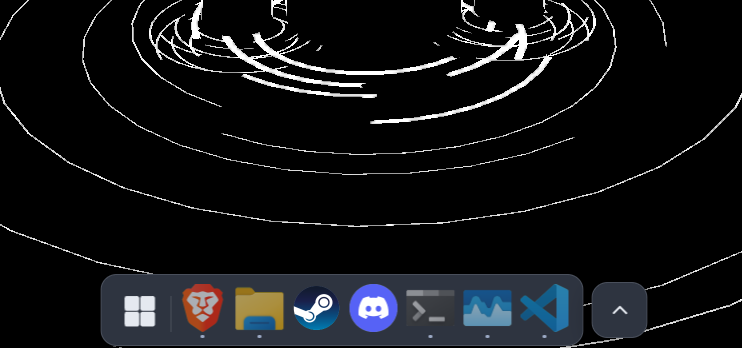
In DeskDash every display gets its own layout. Layouts remember their display and come back when it reconnects, and a display with no widgets renders nothing. For 4K and ultrawide screens, Settings shrinks the widgets on one display to 67%, 50% or 33%, and layout presets save whole arrangements. The same app replaces the Windows taskbar with one from its taskbar marketplace, the macOS-style Dock below among them, under the same sandbox and grants, and the Windows taskbar comes back with one click.
In Rainmeter a skin's position is set per skin, relative to the primary screen by default, or with an @N index from 1 to 32 for a given screen, or 0 for the virtual desktop. You drag skins with the mouse, positions are remembered across restarts, and with the monitor-boundary setting on a skin jumps whole onto the other monitor. The position and arrangement pages document no DPI or display-scaling handling, so scaling is the skin author's job. On the taskbar Rainmeter is explicit: it "cannot change the appearance of your taskbar, Start button, desktop icons, file explorer, or other built-in Windows components", and it is "not a window manager".
How do updates and upkeep work?
DeskDash updates itself and updates widgets and taskbars from the marketplace; Rainmeter updates the application, with no documented way for a skin to update itself.
DeskDash shows release notes in the app after each update and publishes a changelog. The marketplace Updates tab updates every widget and taskbar in one click, or they update on their own.
Rainmeter's current release is 4.5.26, published 20 May 2026. The last three years brought one release in 2023, two in 2024, three in 2025 and three in 2026, in clusters with two gaps of 12 and 13 months. The source repository received commits on 2 September 2026.
Rainmeter's global settings update the application only. Rainmeter documents no way for an installed skin to update itself; Droptop Four ships its own download-based updates instead.
What does each one cost, and what does it run on?
DeskDash is a one-time purchase with every widget and taskbar included; Rainmeter costs nothing.
DeskDash has no subscription, the current amount is on the download page, and it runs on Windows 10 and 11, 64 bit.
Rainmeter costs nothing, with no paid tier and no licence key. It runs on Windows 7 or above, and its deep sensor routes need CoreTemp, SpeedFan or HWiNFO installed and running.
Which one fits you?
Pick DeskDash for widgets that act, a taskbar from the same store and a grant before each widget runs; pick Rainmeter for deep sensor readouts through HWiNFO and a skin you write line by line.
You want widgets you install in a click, configure in a settings pane, and update from one place, with a record of what each one may touch before it runs. That is DeskDash's marketplace, permission model and sandbox.
You want widgets that do things rather than show things: an app drawer, a task list, playback and system controls, a game launcher, each keeping its state between sessions. That is DeskDash's interactive widgets with storage.
You want a dock or a different taskbar from the same app that runs your widgets, and a layout per display across two or more screens. That is DeskDash's taskbar marketplace and per-display layouts.
You build widgets and already know HTML, CSS and JavaScript. DeskDash's SDK and docs are written for you. Rainmeter's authoring language is its INI format plus Lua.
You want per-core temperatures, voltages or fan speeds on the wallpaper, and you already run HWiNFO or CoreTemp. That reach is Rainmeter's, through the plugin or registry routes.
You want a text-editor workflow and a skin you wrote line by line. A Rainmeter skin is an INI file, and the manual puts writing one at HTML or JavaScript difficulty.
Frequently asked
- Does DeskDash read hardware sensors like HWiNFO?
- DeskDash reads CPU, RAM, GPU, disk, network, drive space, battery and wifi, and each widget has a setting for which of them it shows. System Vitals draws them as sparklines and System Rings as radial gauges, with no second app to run. Temperatures, voltages and fan speeds are not in that set today; they are planned. Rainmeter reads those through CoreTemp, SpeedFan or HWiNFO, each running alongside it.
- Can Rainmeter skins be converted to DeskDash widgets?
- A skin is an INI file of measures and meters; a DeskDash widget is a web page in HTML, CSS and JavaScript. Moving one across means writing the widget, starting with the first-widget tutorial.
- Is Rainmeter still maintained?
- Yes. Version 4.5.26 shipped on 20 May 2026, the repository received commits on 2 September 2026, and releases arrive in clusters separated by year-long gaps.
- Is Rainmeter safe?
- The application is free and open source. What a skin can do is the real question: RunCommand runs any program, can hide its window, and no prompt to the user is documented. Rainmeter's own manual says most skin sites verify neither uploader nor files.
- Does Rainmeter work on Windows 11?
- The stated requirement is Windows 7 or above. On 24H2, Show Desktop hid skins from June 2024 until the fix merged in April 2025.
Keep reading
Rainmeter alternatives in 2026: which ones are still maintained, and what each widget can reach on your PC
Rainmeter alternatives audited for August 2026: last release, licence, real price, and what a widget can reach on your PC once installed.
DeskDash vs Seelen UI: a whole desktop suite, or widgets and a taskbar
DeskDash vs Seelen UI compared: what each changes on Windows, where widgets come from, what a widget can reach, taskbars, multi-monitor and price.
Is DeskDash safe? How every widget is sandboxed and asks before it runs
Is DeskDash safe? Every widget runs in a sandbox, reaches nothing on its own, and store widgets ask before they run and pass a human code review.