
Is DeskDash safe? How every widget is sandboxed and asks before it runs
Is DeskDash safe? Every widget runs in a sandbox, reaches nothing on its own, and store widgets ask before they run and pass a human code review.
DeskDash runs every widget in a sandboxed frame, a web page that cannot see the app around it. On its own a widget reaches nothing, the network included. Before a widget you install from the store runs, you see every permission it asks for and decide what to grant. Every store submission passes automated checks, then a person reads the code.
The app is built as if every widget might be hostile, because what users rely on has to hold for the worst widget on the marketplace, not the average one. In the homepage FAQ, the founder's answer to "Is it safe to run widgets I didn't write?" is a commitment to keep the verification process at a high level.
The DeskDash here is the Windows widget and taskbar app from this site, desktop-dashboard.com. A separate product that overlays calendars and stock tickers on a wallpaper also uses the name DeskDash, and nothing on its page connects it to this one.
Who checks a widget before it reaches the store?
Every submission goes through automated checks and then a human review of the actual code before any listing appears.
The automated part is strict. Upload validation enforces the manifest rules (the manifest is the file where a widget declares what it is and what it wants), and unknown fields are errors.
The human part depends on readable code. The reviewer reads every file, so no minified or obfuscated code is accepted, and widgets ship as plain source with no build step. Permissions must be justified by what the widget visibly does, and web hosts and link prefixes get particular attention.
Authors are not anonymous. Publishing needs a purchased DeskDash account, and the publisher handle becomes part of every widget id.
Once accepted, a version is fixed. Its exact bytes are what users install, verified against a checksum, and no one, the author included, can replace them.
What does DeskDash ask before a widget runs?
Before a widget you install from the store runs, DeskDash shows every requested permission in plain language, with each web host and link type spelled out item by item, and you can withhold any of them. Widgets that come with the app are installed alongside it and run with the permissions their listing and manifest declare.
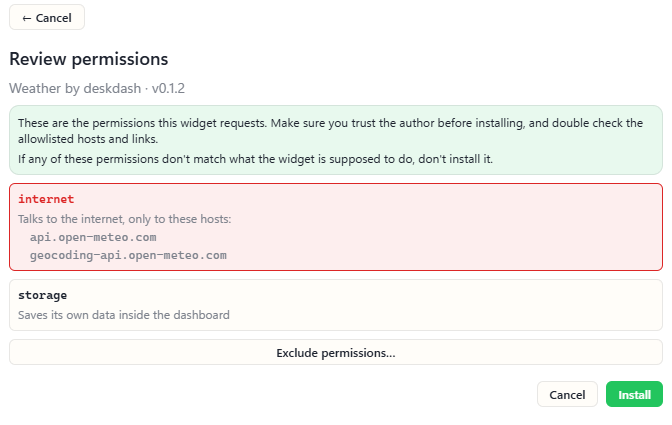
The starting point is nothing. Everything is denied by default, and you consent at install time, permission by permission. The wording in the permission table is exactly what the marketplace shows at install. Four examples:
| Permission | Shown at install as |
|---|---|
| files | Reads files or folders you explicitly pick for it |
| system | Reads system stats like CPU, memory and battery |
| power | Shuts down, restarts (also into advanced startup), sleeps, locks or signs out of this PC |
| games | Sees the games installed on this PC and can start them |
Two lines on the prompt state exactly what a grant allows, which is why the list is shown. "Talks to the internet, only to:" followed by hostnames means the widget can send requests to those exact hosts and no others, with no wildcards and every redirect hop re-checked. "Can open these link types on your PC:" means only links that start with those prefixes, and dangerous schemes are refused whatever a manifest declares.
Reading never implies acting. System stats and system controls are separate grants, and power is its own permission, so granting a volume slider is not granting the ability to turn the machine off.
What you withhold stays withheld. A denied capability behaves exactly as if the manifest never declared it. The grant only ever narrows, and an update that asks for something new asks you again, for exactly the additions.
What can a widget reach while it runs?
A running widget is a web page in a sandboxed frame that can compute and render, and every reach beyond that goes through the app, which checks it.
The frame allows scripts and nothing else, and it gets an opaque origin: in plain terms, a page that cannot reach into the surrounding app and shares no cookies or storage with anything. The app's internal command channel is unusable from widget frames, so there is no path from widget JavaScript to the host application, the filesystem or the OS.
The network is the load-bearing line. Every response served to a widget carries a content security policy, the browser rule that tells a page what it may load and connect to, and its connection rule is connect-src 'none': the page cannot open a connection of any kind, from any widget, ever. Under the same policy, scripts load only from the widget's own folder, so there is no remote code, no inline script and no nested frames.
Data still gets in, by two routes, and both run through the app: a web fetch against the exact hostnames the manifest declared and you consented to, re-validated on every redirect hop, and a feed fetch at an address you typed into a setting, which returns only the parsed items.
Identity is not something a widget states. The app knows who is asking from which frame sent the message, never from anything inside it, so a widget cannot claim to be another widget. Every call is re-validated inside the app, and the SDK (the toolkit widgets call) is convenience, not enforcement, so nothing a widget does in JavaScript can skip the checks.
Can a widget read my files, my passwords or my API keys?
A widget reads only the file you picked for it in its settings, and the value of a secret never enters the widget at all.
The rule the docs apply to every sensitive capability is short: the widget names things, the user supplies them, the host resolves them.
API keys and passwords. A secret setting names a credential; you pick which stored secret it means, the app injects the value into the outgoing request, and the value itself never enters widget code, logs or error messages. API keys live in Windows Credential Manager, never in widgets.
Files. A file setting is a path only you can fill in, and manifest defaults for it are ignored, so no widget can ship pre-pointed at anyone's files. A file read returns the file you configured in that setting, capped at 1 MB.
Desktop and folder items. A widget granted desktop or folder access sees what is on the desktop or in the folder you pointed it at, and it can open an item only by the id the app issued, never by a path. Items you drop on a widget reach it as an id, a name, a kind and an icon only, and nothing the widget says can add an item.
Games and wifi follow the pattern. A games widget gets opaque ids, meaning tokens with no information inside them, and the appid, the registry id and the install path never cross. Wifi connect works only for networks Windows already has a profile for, and passwords never cross the bridge.
Can widgets see each other, or my open windows?
Widgets are mutually invisible, and only a taskbar with the taskbar grant receives your open windows; a desktop widget never does.
There is no widget-to-widget channel, no shared storage, and no way to enumerate what else is running. The two exceptions run through you: one widget can control another only on the instances you ticked in its settings, and there is deliberately no way for a widget to write its own settings, because that would let widgets approve themselves.
Taskbars are the one kind that sees your windows, because showing them is their job. The taskbar surface is refused for every other kind before permissions are even read. A taskbar with the grant receives the list of open windows with their titles for its previews and labels. Launching, pinning, closing and tray clicks run inside the app, and what comes back is a count or an open state, never an icon, a handle or a menu.
What happens when a widget misbehaves?
A misbehaving widget only affects itself; the desktop and every other widget keep running.
A failed call returns a typed error to the widget and nothing else. A hidden widget unmounts entirely, so nothing invisible keeps running or listening. If a stored grant record is corrupted, it fails closed to deny-all, and no stored state can escalate past the manifest.
The app protects its own updates the same way: application updates are cryptographically signed and verified before they can be installed.
A way around any of this counts as a bug. The security docs say any other door is worth reporting to contact@desktop-dashboard.com. The privacy policy states that no system is completely secure and asks for a report before public disclosure.
What does DeskDash send off my PC?
The app talks to its servers for three things only, checking for updates, validating your licence and browsing or downloading from the marketplace, and it contains no analytics, tracking or crash reporting.
The policy calls its request table the complete list:
| Request | What it carries |
|---|---|
| Update check | Nothing identifying |
| Licence validation | Licence key, hashed device identifier, two widget counts |
| Marketplace browsing | Anonymous, session token held in memory |
The two counts are how many widgets you have set up and how many are on screen. The servers never receive your layout, your settings, the contents of any widget, or anything about what you do on your computer, those two counts excepted.
A widget's own connection to an outside service goes directly from your computer to that service and not through DeskDash; the review and the sandbox constrain what a widget can reach, but they do not control what a third-party service does with data it receives. That is why the install prompt names every host: a widget's web requests go to those exact hosts, with no wildcards.
What can a desktop widget reach in general?
What an add-on can reach depends on the app's model, and each classic model documents it: a Windows 7 gadget runs with all the permissions of your login account, and a Rainmeter skin can run any external program.
Windows 7 gadgets. Microsoft's archived gadget security page says, under Full Trust, that after the user accepts the warning, the gadget runs with all of the permissions associated with the user's login account. Gadgets are not limited by the standard browser security model, and in aggregate they have the same functionality as other code.
Rainmeter skins. The manual's RunCommand plugin executes an external command or program in Windows, allowing the skin to obtain and use any output from the program. Its State option lists Hide as the default, and the page describes no per-skin permission prompt.
Packaged Store apps. Microsoft's capability reference lists runFullTrust as the restricted capability a package needs when it uses features that need full trust.
Each model states what its add-ons can reach, and the line is yours to draw. The Rainmeter alternatives guide goes through what each current tool's widgets can reach on your PC, and the DeskDash vs Rainmeter comparison puts two of these models side by side.
Frequently asked
- Can a DeskDash widget read my files?
- Only the file you picked in a file setting, capped at 1 MB. A desktop or folder widget sees the items in the place you pointed it at and opens them only through the app.
- Can a widget see my API keys or passwords?
- No. The app injects a secret's value into an approved request, and the value never reaches widget code, logs or error messages. Wifi passwords never cross the bridge either.
- Can a widget access the internet on its own?
- No. The content security policy forbids every connection from the frame. The only route is through the app, to the exact hosts you approved at install.
- Who reviews widgets in the store?
- Automated validation runs first, then a person reads every file of plain, unminified source. Every author holds a purchased account.
- Where do I download DeskDash?
- From the official download page on desktop-dashboard.com: the installer downloads straight after checkout, and the app updates itself from then on, with every update signed and verified before it installs.
Keep reading
Desktop gadgets for Windows 11: what replaced the sidebar
Windows 11 has no desktop gadgets. Why Microsoft removed them, why the Widgets board is not the same thing, and the apps that put gadgets on the desktop.
DeskDash vs Seelen UI: a whole desktop suite, or widgets and a taskbar
DeskDash vs Seelen UI compared: what each changes on Windows, where widgets come from, what a widget can reach, taskbars, multi-monitor and price.
DeskDash vs Rainmeter: what each one can reach on your PC
DeskDash vs Rainmeter, side by side: where widgets come from, what each one can run on your PC, sensors, multi-monitor, taskbar and price.