
System Controls widget
by deskdash · v0.1.3 · 80 downloads
Widgets install from inside DeskDash.
Wifi, volume and battery in one bar: network list with connect/disconnect, working volume slider, settings shortcuts
- Wifi, volume, and battery in one compact icon bar
- Icons light up with live state from the host's vitals stream
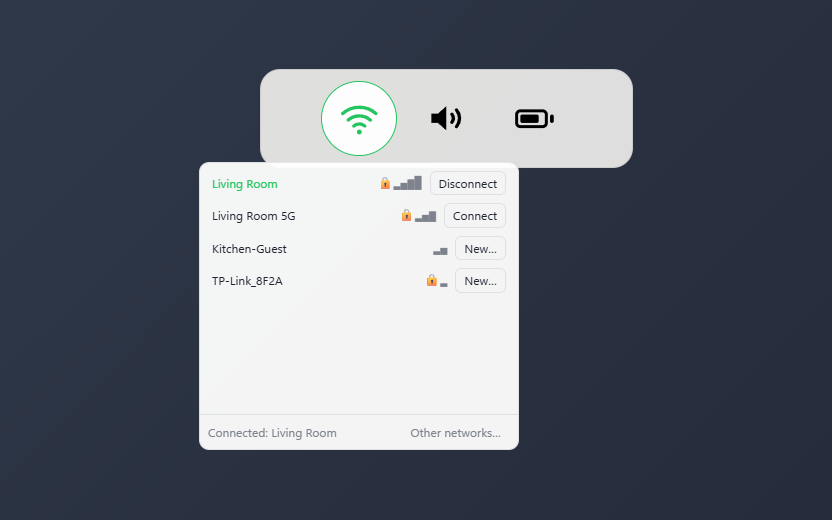
- Wifi pane lists networks with connect and disconnect for saved profiles
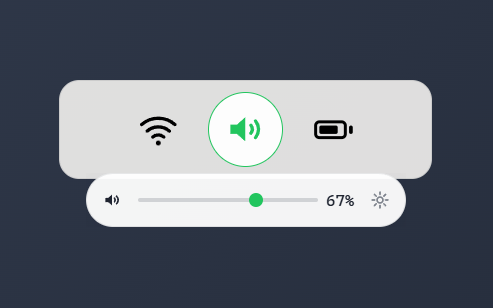
- Volume pane with a working slider and mute
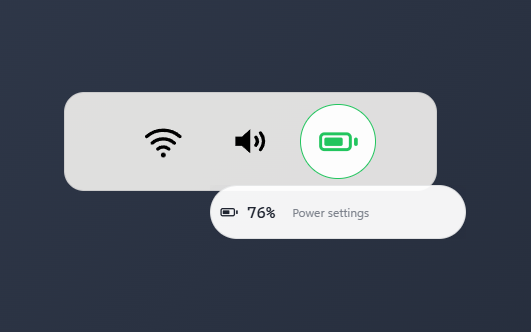
- Battery pane with charge detail and a power settings shortcut
About this widget
System Controls packs wifi, volume, and battery into one compact icon bar, lit by live state from the host's vitals stream. Clicking an icon opens a flyout pane next to the bar: the wifi pane lists nearby networks and can connect or disconnect saved profiles, the volume pane is a working slider with mute, and the battery pane shows charge detail with a shortcut to Windows power settings.
Each of the three controls can be hidden individually, so the bar can shrink to exactly the icons you use. The strip itself takes the standard panel styles, from a solid card to nothing at all, and its icons can follow your theme accent or a color you pick.
What it can access
- system
Reads system stats like CPU, memory and battery
- systemControls
Changes system settings such as volume, sound devices, Wi-Fi, Bluetooth and brightness
Settings you can adjust
- Show wifi
On or off
- Show volume
On or off
- Show battery
On or off
- Panel style
One of: none, solid, transparent, image
- Background image
A file you pick
- Image fit
One of: cover, contain
- Use theme accent color
On or off
- Custom color
A color of your choice
Details
- Version
- v0.1.3
- Size
- 11 KB
- Uploaded
- 24 Jul 2026
- Last updated
- 17 Oct 2026
Version history
- v0.1.3
- 17 Oct 2026 · 11 KB
- v0.1.2
- 10 Aug 2026 · 11 KB
- v0.1.1
- 28 Jul 2026 · 11 KB
- v0.1.0
- 24 Jul 2026 · 10 KB


