
Rainmeter alternatives in 2026: which ones are still maintained, and what each widget can reach on your PC
Rainmeter alternatives audited for August 2026: last release, licence, real price, and what a widget can reach on your PC once installed.
The maintained Rainmeter alternatives in 2026 are DeskDash (a one-time purchase, interactive widgets and taskbars on the wallpaper, every one sandboxed and free), Seelen UI (free and open source, a whole desktop suite: widgets, a dock and a tiling window manager), Themia (freemium, the vendor's own 22 widgets), GadgetPack (free, the Windows 7 gadgets) and Widget Launcher (free, Microsoft Store). Wallpaper Engine and Lively do animated wallpaper only, no widgets. Rainmeter itself is not dead: it is free, open source and shipped version 4.5.26 on 20 May 2026. People look for alternatives because a skin can run any program with your full user rights, and because old skin sites are closing.
Below, every tool by last release date, licence, real price, where widgets come from, and what a widget can reach on your machine once it runs.
The audit table
Prices were read on vendor pages on 26 August 2026. Steam figures move with live discounts.
| Tool | Licence | Price | Widgets come from | What a widget can reach | Verdict |
|---|---|---|---|---|---|
| DeskDash | Proprietary | One-time purchase | Built-in marketplace, first-party and community, all free | Sandboxed, each capability granted per widget before it runs, you can deny some permissions | Alive; interactive widgets and taskbars on the wallpaper |
| Rainmeter | GPL-2.0 | Free | Third-party skin sites, unverified | A skin can run any command with your user rights, no prompt | Alive; trust the skin, not the app |
| Seelen UI | AGPL-3.0 | Free app; Seelen Sky subscription for extras | Built in plus custom | Widgets load in an isolated webview but call the app's commands directly; no per-widget grant | Alive, fast moving, rough edges |
| Themia | Proprietary | Free, or $19 Pro one-time | Vendor's own 22 widgets | The vendor's own widgets only, no third-party code | Alive, freemium, capped free tier |
| GadgetPack | Freeware | Free | Windows 7 gadget platform | Revives a platform Microsoft advised disabling over remote code execution | Alive; for people who miss the old gadgets |
| Widget Launcher | Proprietary | Free, with in-app purchases | Vendor's own | Third-party extensions run inside a full-trust app, no permission model documented | Alive, easiest, ad-supported |
| BeWidgets | Proprietary | Free on the Microsoft Store | Vendor's own | The vendor's own widgets only, no third-party code | Alive, thin set |
| XWidget | Proprietary | EUR 3.99 list on Steam | Widget server, reported down | JavaScript widgets from a gallery, no updates since 2022 | Avoid |
| Windows 11 Widgets Board | Proprietary | Free | Packaged apps or PWAs, Adaptive Cards | Declarative Adaptive Cards from packaged provider apps | Overlays the desktop, doesn't sit on it |
What can a Rainmeter skin actually do on your PC?
A skin is a plain-text .INI file, and that is why it looks harmless. Its reach is the part nobody mentions: Rainmeter's RunCommand plugin "executes an external command or program in Windows", can start it with a hidden window, and asks for no per-skin permission. Whatever your Windows account can do, a skin can do, silently.
Rainmeter itself is clean; the question is every skin you download. Its own docs say most skin sites "have no policy of verifying either the identity of the uploader or the integrity of the files", tell you never to run a .exe that claims to be a skin installer, and send suspect files to VirusTotal. Old skin sites are gone too, so people hunt for mirrors of unknown origin.
The other tools sit between those poles; the reach column in the table has each one. Seelen UI loads widgets into an isolated webview but lets them call the app's commands directly. Widget Launcher runs third-party extensions inside a full-trust app. Themia and BeWidgets run only their own widgets. GadgetPack revives the platform Microsoft's advisory, "Vulnerabilities in Gadgets could allow remote code execution", told people to switch off. The Windows 11 Widgets Board accepts only declarative Adaptive Cards from packaged apps.
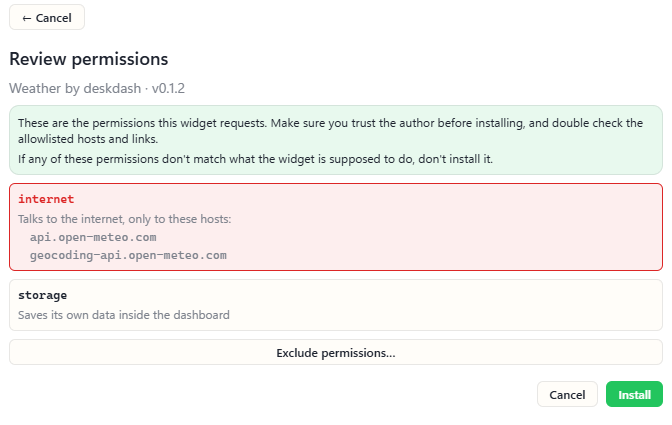
DeskDash is the one tool in this set that makes you answer the question up front. Each widget runs in a sandbox with no direct reach into files, the network or other widgets. Before it runs, you see the capabilities it asks for and grant them per widget; the reference lists what each permission unlocks. API keys live in Windows Credential Manager, never inside a widget, and a misbehaving widget only affects itself.
Which Rainmeter alternatives are still maintained in 2026?
As of 26 August 2026, the maintained ones are DeskDash, Seelen UI, Themia, GadgetPack, Widget Launcher and BeWidgets; XWidget is discontinued.
DeskDash shipped Taskbars on 25 August 2026, its eighth release that month; the changelog dates every version.
Seelen UI ships roughly weekly: v2.8.0, v2.8.1 and v2.8.2 landed between 20 July and 3 August 2026. It has 17.6k GitHub stars, about three times Rainmeter's 6.0k, with a last push on 24 August 2026.
Themia is active: its pricing page is live and its blog carries posts dated 21 April and 10 August 2026. GadgetPack put out version 42.0 on 11 May 2026. BeWidgets was updated on 12 March 2026, but Softpedia's users rate it 1.8 out of 5 against the editor's 4.0.
XWidget is marked discontinued, last version October 2022. Its Steam score is Mixed, 66% positive from 409 reviews, and buyers report the developers have vanished.
The Windows 11 Widgets Board is maintained by Microsoft, which is walking back its defaults. Insider build 26300.8346, rolling out from 3 May 2026, turns off open on hover, taskbar badging, taskbar alerts and the MSN feed on first launch.
Rainmeter itself shipped three releases in May 2026 after a 13-month gap; the release before those, 4.5.23 in April 2025, fixed antivirus false positives. The 4.5.26 installer alone has been downloaded 6.1 million times from GitHub.
Directory pages won't tell you this. AlternativeTo lists 42 alternatives, dead and living side by side, five of the top twelve not Windows tools at all.
The alternatives, one by one
DeskDash
DeskDash puts widgets and a taskbar on the wallpaper, behind your normal windows, in one install. You find, install, grant, update and remove widgets and taskbars inside the app, from a marketplace where every listing is free and other authors publish beside the first-party ones; among the taskbars are Dock, a macOS-style floating dock, and Pulseglass Dock, a community taskbar by kaladindmp. The Windows taskbar comes back with one click. The widgets are interactive and keep their state: Desktop Drawer turns any folder into an app drawer, Todo keeps the list you tick off, Now Playing controls the music, and Steam Recent lists your last Steam games and launches one on click. Every widget is sandboxed and asks for its capabilities before it runs. Widgets are plain HTML, CSS and JavaScript, no build step. Every display gets its own layout, and layouts come back when a display reconnects. It runs on Windows 10 and 11, 64 bit. One purchase, no subscription, and every widget and taskbar is included.
Seelen UI
Seelen UI adds a whole suite over Windows, not only widgets. It renders widgets on the desktop (clocks, monitors, media controls, weather) and adds a themeable taskbar, a tiling window manager, a dock, a launcher and virtual desktops. The app is open source under AGPL-3.0 and free to install; a paid Seelen Sky subscription, monthly or annual, adds cloud sync, exclusive widgets and themes, priority support and no ads on its website. Open issues include the toolbar not displaying, Win+L failing to lock, and Win+D hiding the dock and widgets on Windows 11 24H2. AlternativeTo reviewers give it 3.4 out of 5, call it "daunting", and complain that most information lives on Discord.
Themia
Themia is a polished widget set for Windows 10 and 11: Email, Calendar, Forecast, Folder and Notes plus 17 more. The free tier includes every widget type but caps you at 10 widgets and 2 screens on one device. Pro is $19 one-time, covers up to 5 devices and needs no account. The homepage claims it runs "without slowing things down, even on older laptops", a claim, not a measurement. Themia's own blog notes that for full sensor access, Rainmeter with HWiNFO goes deeper.
GadgetPack
GadgetPack installs the gadget platform from Windows 7, patched for Windows 10 and 11, at version 42.0 since 11 May 2026. It is free, donation only. If you miss the old clock and CPU meter gadgets, this is the only tool that gives you exactly those.
Widget Launcher
Widget Launcher is a free install from the Microsoft Store. Pocket-lint notes it shows brief ads when loading new widgets. The Store listing marks in-app purchases without showing their prices, and was last updated on 12 June 2026. XDA named it the "easiest for beginners". Fair enough: zero setup, ads as the price.
BeWidgets
BeWidgets covers time, date, photos, finance and app shortcuts, last updated 12 March 2026. The Microsoft Store listing is free, updated 2 April 2026, with no in-app purchases flagged. Softpedia users rate it 1.8 out of 5.
uWidgets and WinWidgets
Two small open projects deserve a line. uWidgets is a free .NET 8 app with six widget types under CC BY-NC-SA 4.0. WinWidgets is GPL-3.0, has 153 stars, and builds widgets from HTML, CSS and JavaScript.
XWidget
XWidget is discontinued, last version October 2022. Steam still lists it at EUR 3.99, but buyers report the widget server is down, the paid build duplicated the free download, and it looks pixelated on 4K. Don't pay for it.
Windows 11 Widgets Board
Microsoft defines the board as "a flyout plane that overlays the Windows desktop", opened from the taskbar icon, Win+W or a swipe. It is free and already installed. It never puts anything on the desktop itself, though.
Wallpaper Engine and Lively
Both do animated wallpapers and neither does widgets. Wallpaper Engine is listed at EUR 4.99 on Steam, supports 3D and 2D animation, video and websites, and says nothing about widgets or monitoring. It has over a million reviews and an Overwhelmingly Positive rating. Lively is free, GPL-3.0, with 19.5k stars, and covers wallpapers and screensavers only. They are tools for motion; the rest of this list is about information on the desktop.
What do the alternatives actually cost?
DeskDash is a one-time purchase with every widget and taskbar included; Rainmeter, GadgetPack and Lively are free, and the rest are freemium or a one-time price.
One-time paid: DeskDash has no subscription, every widget and taskbar is free, and the homepage shows the current amount. Wallpaper Engine is EUR 4.99, its list price, with no discount running on 26 August 2026. XWidget lists at EUR 3.99, but it is discontinued, so the price is moot.
Free, with no paid tier at all: Rainmeter, GadgetPack and Lively.
Freemium: Seelen UI is free to install, with the Seelen Sky subscription (monthly or annual) for cloud sync and its exclusive widgets and themes. Themia is free up to 10 widgets, then $19 one-time for Pro. Widget Launcher is free with in-app purchases. BeWidgets is free on the Microsoft Store.
Where Rainmeter still fits
If you want deep sensor data (voltages, NVMe temperatures, VRM current), Rainmeter paired with HWiNFO is still the best option, and a competing vendor says so in print. Nothing else on this list gets that far down.
Rainmeter's skin library is the largest in this list, and it holds 4.7 out of 5 on AlternativeTo with 517 likes; "there's something for everyone's taste". r/Rainmeter has about 323,000 members, growing around 1% a year.
Customising a skin means right-clicking it, choosing "Edit skin", and changing values in Notepad; a graphical settings panel exists only where a skin author built one. One AlternativeTo reviewer had widgets disappear and could not get Rainmeter to run again; another says the layouts haven't been updated in a while.
Anyone running Rainmeter should follow its own rules: never run a .exe that claims to be a skin installer, check the uploader's history, and scan anything doubtful with VirusTotal.
Which one should you pick?
Pick DeskDash for interactive widgets and a replacement taskbar, each widget sandboxed and granted its access before it runs; the others fit narrower needs:
- DeskDash: widgets plus a replacement taskbar on the wallpaper, each widget sandboxed and asking for its capabilities before it runs, one purchase with every widget and taskbar included.
- Rainmeter: deep sensor readouts through HWiNFO, the largest skin library, and skins that run with your full user rights.
- Seelen UI: open source, widgets plus a dock and a tiling window manager, a subscription for its exclusive widgets and themes, and open bugs in basic desktop integration.
- Themia and Widget Launcher: a small set of the vendor's own widgets; Themia caps its free tier at 10 widgets, Widget Launcher shows ads.
- GadgetPack: the Windows 7 gadgets, as they were.
- Wallpaper Engine and Lively: animated wallpaper, no widgets.
- XWidget: discontinued.
Frequently asked
- What is the closest Rainmeter alternative for Windows 11?
- DeskDash. It puts widgets on the desktop and replaces the taskbar, and it is the one where anyone can build a widget in plain HTML, CSS and JavaScript and share it through the marketplace.
- Which Rainmeter alternative has interactive widgets?
- DeskDash. Its widgets take clicks and keep their state: Desktop Drawer turns any folder into an app drawer, Todo keeps the list you tick off, Now Playing controls the music, and Steam Recent launches your last Steam game. A Rainmeter skin can act on a click too, but the author hand-wires each action in the skin's .INI file.
- Is Rainmeter still maintained in 2026?
- Yes. Rainmeter 4.5.26 shipped on 20 May 2026, the third release that month, after a gap of about 13 months.
- Is it safe to download Rainmeter skins?
- Rainmeter's own docs say most skin sites verify neither the uploader nor the files, and tell you never to run a .exe skin installer and to scan doubtful files with VirusTotal. A skin can run any external program with a hidden window and no permission prompt.
- Which Rainmeter alternative is free and open source?
- Seelen UI is open source under AGPL-3.0 and free to install, with its exclusive widgets and themes behind the paid Seelen Sky subscription. GadgetPack is free but not open source, and Lively is free under GPL-3.0 but does wallpapers, not widgets.
- Does Wallpaper Engine do widgets?
- No. Its Steam page covers live wallpapers, animation, video and websites, and doesn't mention widgets or system monitoring.
- How much CPU or RAM does Rainmeter use?
- No measured public figure exists. The question recurs on Hacker News and on Rainmeter's own forum without a number in reply.
Keep reading
DeskDash vs Rainmeter: what each one can reach on your PC
DeskDash vs Rainmeter, side by side: where widgets come from, what each one can run on your PC, sensors, multi-monitor, taskbar and price.
DeskDash vs Seelen UI: a whole desktop suite, or widgets and a taskbar
DeskDash vs Seelen UI compared: what each changes on Windows, where widgets come from, what a widget can reach, taskbars, multi-monitor and price.
Is DeskDash safe? How every widget is sandboxed and asks before it runs
Is DeskDash safe? Every widget runs in a sandbox, reaches nothing on its own, and store widgets ask before they run and pass a human code review.